Sibelius versus tilde – updated
A long-standing frustration of mine is the way the music notation package Sibelius handles the 'tilde' sign ~ in text. As a sort of clever bodge or hack, it is used to hide midi messages, so that a control change for example can be put in the score as '~C64,127', but won't print out.
However, I'm of the frequent habit of using the ~ sign to mean 'approximately'; I'd love to be able to mark a pause, for instance as '~45 seconds', meaning roughly 45 seconds, but when you do that the text gets hidden.
Today I thought I'd found a hack for the hack, a workaround for the workaround. In the character palette on the mac, I found something called the 'tilde operator' character under the maths category which looks exactly the same, but as it isn't an ascii tilde, Sibelius doesn't hide the text;
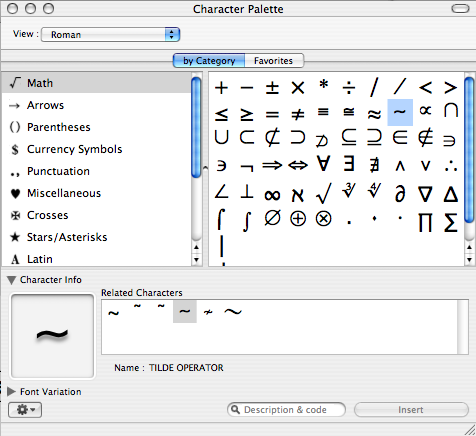
However, something else kind of strange happens. When I'm editing the text string in Sibelius the character seems to display correctly, but when I come out of edit mode it gets displayed as a grey box;


So, still impossible to use a ~ character in text anywhere in Sibelius without the text being hidden. How frustrating.
Update
Following some helpful remarks on the Yahoo! Sibelius group and in my blog comments, this has been cleared up a bit. The ~ character isn't in the Arial font, but inserting it as Symbol font works fine; this seems to kind of happen automagically in Word and Pages and not Sibelius, but that's fine and easy to fix.
There's also been a suggestion that I shouldn't use this symbol as it wouldn't be clear to musicians. On looking into this is discover that ~ as an abbreviation for 'approximately' is not as widespread as I thought it was, although for me it's an everyday thing. Oh well; being unclear to musicians is all part of the game anyway.